

Why does AI-generated code get tangled? The role of structure in vibe coding
Screenshots show the original interface and may contain Korean text.

With AI-assisted vibe coding, you describe the features you want and let AI generate the code. As this approach has become more common, building websites and web services has become accessible even without specialist development knowledge.
When building Pixoas and other websites, I also thought I could create web tools easily by asking AI for one feature at a time.
But handing everything over to AI did not produce a polished result. I eventually realized that even when anyone can build a website, some knowledge of the subject is necessary to make it stand out.
Drawing on my experience building websites and web tools, this article looks at what to think through and design before you start building a website with AI.
🧩 AI can implement features, but you still need to plan the whole system
I felt the limitations of vibe coding most clearly while developing ImagePrep.
🔗 ImagePrep is a batch image conversion tool that lets you process up to 50 images at once, adjusting formats, file sizes, dimensions, aspect ratios, padding, and filenames.
At first, I asked AI to implement all of these features in one request. After a few attempts, I had something that looked convincing.
Testing told a different story: individual features worked, but combining them caused unexpected conflicts.
For example, changing both image dimensions and aspect ratio, or adding padding and then compressing, exposed cases where the output of one operation interfered with another.
I learned that getting AI to write reliable code requires understanding how the features affect one another and defining the overall structure.
🗂️ I started again with the overall structure
Once you know which features serve your website’s purpose, resist jumping straight into code generation. First, design how each feature should work within the system.
For ImagePrep, I first defined the processing pipeline: what happens after an image is uploaded, and how it becomes the final output.
Select images ➔ Check image information ➔ Edit dimensions, aspect ratio, and position ➔ Compress and convert formats ➔ Generate output files ➔ DownloadWith that flow established, I split the code according to each stage’s responsibility. The folders and files in the GitHub project were organized by function as a result.
| File | Responsibility |
|---|---|
state.js | Manage selected images, settings, and other state |
renderer.js | Calculate image dimensions, aspect ratio, and position, then apply them to Canvas |
compressor.js | Convert JPG, PNG, and WebP formats and adjust compression quality |
queue.js | Process multiple images in sequence and collect the results |
app.js | Connect the user interface to the feature modules |
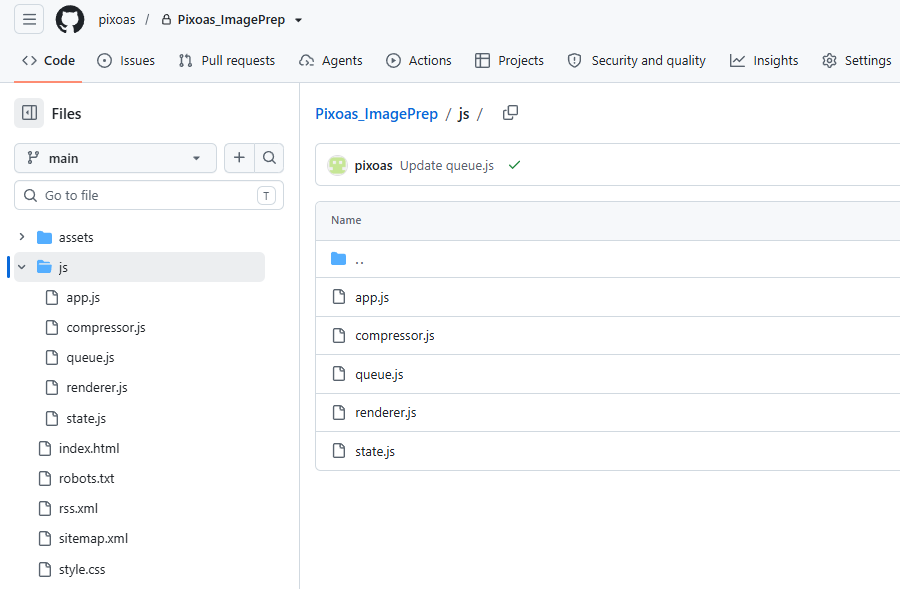
Planning the structure in advance initially felt like it would slow development down. In practice, the opposite happened.
When adding or changing a feature, it became much clearer which part of the code to inspect. That made requesting and refining code with AI considerably easier.
🤖 The way I asked AI to code changed, too
Before defining the structure, I would simply say, “Build this feature.” Afterwards, I began providing context about which file and which behavior needed to change.
For an image compression change, for instance, I provided context like this:
“Image compression is currently handled by compressor.js. Keep the existing Canvas rendering flow in renderer.js and change only the compression optimization logic inside compressor.js. Do not alter the behavior of other files.”
By clearly defining the scope of AI’s work, I reduced conflicts between parts of the code and obtained more accurate, higher-quality results with far fewer tokens.
💡 What people still need to do in vibe coding
AI has made writing code much easier, including for people who are not developers. But people still need to decide what to build, which features it needs, and how those features should connect.
As features become more complex, defining and structuring the goals before writing code becomes a deciding factor in the quality of the result.
Now, before implementing a new website, I plan what I am building, how to divide its features, and how the files relate to one another.
Vibe coding lowers the barrier to development, but planning the overall structure, defining the scope, and giving AI precise context are what lead to a polished result.
Of course, AI can also help you think through what to build and which features and structure it needs. In a future article, I hope to explore how to use AI during that planning stage.